

Travelling by train is a special part of life for many of us, family trips, festival journeys, visiting hometowns, or simply exploring India’s beauty. But sometimes, booking train tickets on IRCTC becomes stressful, especially when you reach the monthly booking limit.
This is where Aadhaar verification on IRCTC makes your life much easier. It’s a small step that unlocks more features, gives you more freedom to book tickets, and adds an extra layer of security.
In this guide, we will discuss why Aadhaar verification is important, how to complete it smoothly, its benefits, and a real human experience that many of us can relate to.
Why Aadhaar Verification Matters on IRCTC
Many people wonder, “Why do I even need to verify Aadhaar on IRCTC?”
The answer is simple: convenience and trust.
IRCTC has millions of users. To avoid misuse of accounts, fake IDs, and black marketing of tickets, the platform encourages users to verify their identity. Once Aadhaar is verified, IRCTC knows the account is genuine and can safely offer more flexibility.
Here’s why it matters:
- You get double the monthly ticket limit, from 6 to 12 tickets.
- You build a more secure and trusted profile on IRCTC.
- During urgent bookings—like Tatkal—your verified details help process things smoothly.
- Aadhaar verification also prevents people from misusing multiple fake accounts.
In short, it’s a simple but powerful step that makes your train-travel experience better.
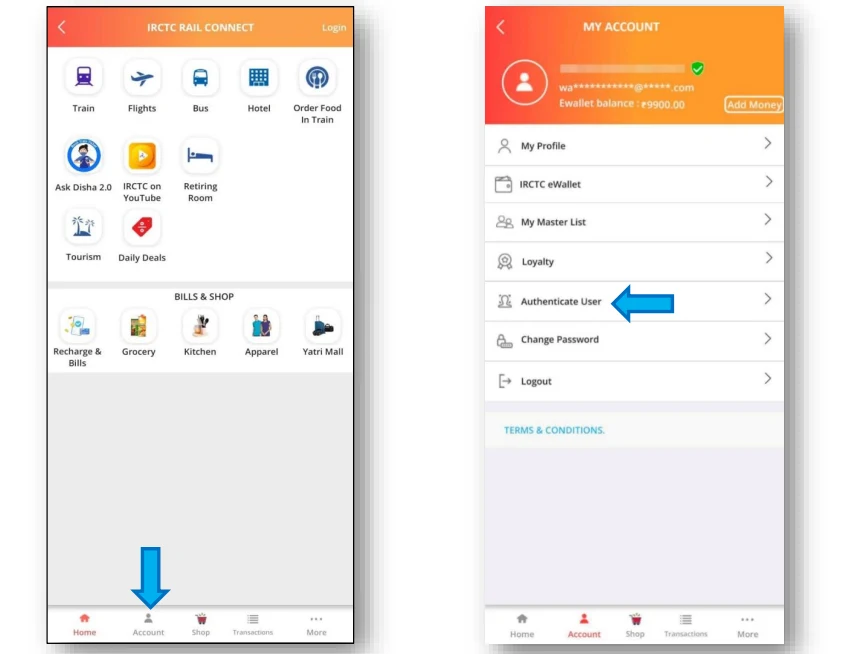
How to Verify Aadhaar in IRCTC (Easy Step-by-Step Guide)
You don’t need any documents, photos, or uploads. All you need is your Aadhaar number and the mobile number linked with Aadhaar.
Follow these steps:
1. Log in to IRCTC
Open the IRCTC website or app and log in with your username and password.
2. Go to ‘My Profile’
Once logged in, find My Profile in the menu and click on Master List or Edit Your Passenger details. There You will find Authenticate with Aadhaar / Aadhaar Verification.
3. Enter Your Aadhaar Number
Type your 12-digit Aadhaar number carefully.
4. Click on ‘Send OTP’
IRCTC will send a one-time password (OTP) to your Aadhaar-linked mobile number.
5. Enter the OTP
Type the OTP you received and click Verify.
6. Verification Successful
Within a few seconds, your Aadhaar will be verified. You’re now eligible to book 12 tickets every month.
Benefits of Aadhaar Verification in IRCTC
Aadhaar verification gives you a smoother and more stress-free booking experience:
✔ Book Up to 12 Tickets Per Month
Perfect for large families, frequent travellers, or people managing bookings for parents.
✔ Faster Identity Processing
A verified account speeds up various verifications during booking and customer support.
✔ Reduced Fraud & Fake Bookings
Aadhaar ensures your account is genuine, helping IRCTC maintain a clean system.
✔ Peace of Mind During Travel
You know your identity is officially confirmed, which helps during checks and verifications.
✔ Helpful for Vikalp & Last-Minute Reservations
IRCTC trusts verified users more in sensitive booking features.
Real Life POV Experience – Something Many of Us Have Been Through
“A few months ago, I was planning a surprise trip for my parents. They rarely travel, so I wanted everything to go perfectly. I logged into IRCTC to book their tickets, but suddenly a message popped up saying I had reached the monthly limit of 6 tickets.
I felt stuck. I didn’t want to disappoint them by delaying the booking. While searching for a solution, I noticed the Aadhaar KYC option. Honestly, I expected a complicated process, but it took hardly 2 minutes. I entered my Aadhaar, got an OTP, and boom verification successful.
Immediately, the system allowed me to book more tickets. That moment felt like a small victory. I realized how useful Aadhaar verification is, especially when you’re booking for family or during emergencies.”
Many travellers have shared similar experiences. Aadhaar verification becomes a lifesaver at the right time.
Frequently Asked Questions (FAQs)
1. Is Aadhaar verification compulsory for IRCTC?
Answer: No. You can still book tickets without it. But Aadhaar verification increases your monthly limit from 6 to 12 tickets.
2. What if my mobile number is not linked to Aadhaar?
Answer: You must update it at an Aadhaar Seva Kendra before completing verification on IRCTC.
3. Does IRCTC store my Aadhaar details?
Answer: No. Your Aadhaar number is not stored. Only the verification status is saved.
4. Can I verify Aadhaar for my family members?
Answer: Yes. You can verify Aadhaar for passengers listed under your IRCTC profile too.
5. What if my Aadhaar OTP is not coming?
Answer: Check network, handset time settings, and ensure your mobile number is linked with Aadhaar. Retry after a few minutes.


